
Simulate failures
- Understand the application
- Run the application
- Simulate failures
Despite your best efforts, sometimes things go wrong - a network glitch, a server going offline, or a new bug in your code. One of Temporal's most important features is its ability to maintain Workflow state when something fails. Simulate some failures and see how Temporal responds.
Recover from a server crash
Unlike many modern applications that require complex processes and external databases to handle failure, Temporal automatically preserves the state of your Workflow even if the server is down.
- Make sure your Worker is stopped before proceeding. Press
CTRL+Cin the Worker terminal. - Verify the Workflow is running in the Web UI. If finished, restart it with the Maven command.
- Shut down the Temporal Server with
CTRL+Cin the server terminal. - After it stops, restart it with
temporal server start-devand reload the UI.
Your Workflow is still listed and running:
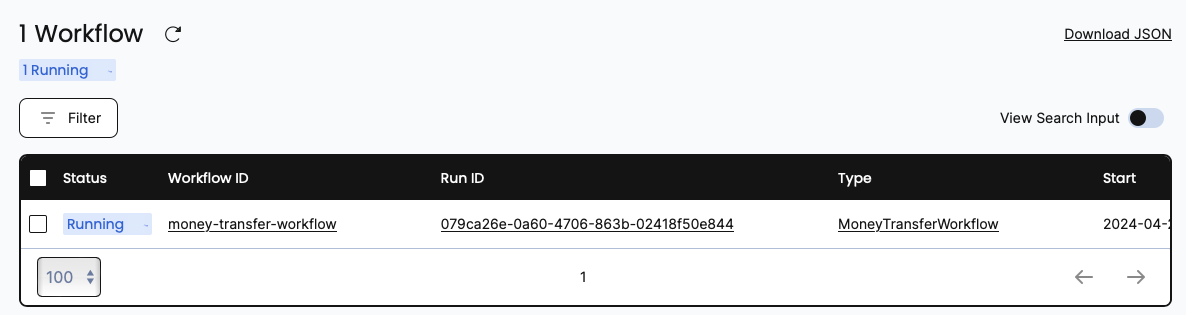
If the Temporal Cluster goes offline, you can pick up where you left off when it comes back online.
Recover from an unknown error in an Activity
This demo application makes a call to an external service in an Activity. If that call fails due to a bug in your code, the Activity produces an error.
To test this out, simulate a bug in the deposit Activity method:
- Stop the Worker by pressing
CTRL+Cin its terminal. - Open
AccountActivityImpland modify thedepositmethod soactivityShouldSucceedis set tofalse. - Save your changes and switch back to the Worker terminal.
- Verify the Workflow is running in the Web UI. If finished, restart it with the Maven command.
- Start the Worker again:
mvn clean install \
    -Dorg.slf4j.simpleLogger.defaultLogLevel=info 2>/dev/null
mvn compile exec:java \
    -Dexec.mainClass="moneytransferapp.MoneyTransferWorker" \
    -Dorg.slf4j.simpleLogger.defaultLogLevel=warn
Note that you must restart the Worker every time the code changes. You'll see the Worker complete the withdraw Activity but error on deposit - and keep retrying:
Withdrawing $32 from account 612849675.
[ReferenceId: d3d9bcf0-a897-4326]
Deposit failed
Deposit failed
Deposit failed
Deposit failed
The Workflow keeps retrying using the RetryPolicy defined earlier. View progress in the Web UI:
Traditionally, you'd implement timeout and retry logic in your service code itself - repetitive and error-prone. With Temporal, you specify timeout configurations in the Workflow code as Activity options.
Your Workflow is running, but only the withdraw Activity has succeeded. In any other application, the whole process would be abandoned and rolled back. With Temporal, you can debug and resolve the issue while the Workflow is running.
Pretend that you found a fix. Switch activityShouldSucceed back to true and save your changes.
How can you update a Workflow that's already halfway complete? You restart the Worker. Cancel the Worker with CTRL+C, then restart it:
mvn clean install \
    -Dorg.slf4j.simpleLogger.defaultLogLevel=info 2>/dev/null
mvn compile exec:java \
    -Dexec.mainClass="moneytransferapp.MoneyTransferWorker" \
    -Dorg.slf4j.simpleLogger.defaultLogLevel=warn
On the next scheduled attempt, the Worker picks up right where the Workflow was failing and successfully executes the newly compiled deposit Activity:
Depositing $32 into account 872878204.
[ReferenceId: d3d9bcf0-a897-4326]
[d3d9bcf0-a897-4326] Transaction succeeded.
Visit the Web UI again and you'll see the Workflow has completed.
You have just fixed a bug in a running application without losing the state of the Workflow or restarting the transaction.
Conclusion
You now know how to run a Temporal Workflow and understand some of the value Temporal offers. You explored Workflows and Activities, you started a Workflow Execution, and you ran a Worker. You also saw how Temporal recovers from failures and retries Activities.
Key advantages Temporal offers:
- Temporal gives you full visibility in the state of your Workflow and code execution.
- Temporal maintains the state of your Workflow, even through server outages and errors.
- Temporal lets you time out and retry Activity code using options that exist outside your business logic.
- Temporal enables you to perform "live debugging" of your business logic while the Workflow is running.
Further exploration
Try the following before moving on:
- Change the Retry Policy so it only retries 1 time. Does the Workflow place the money back into the original account?
What's next?
Build a Temporal app from scratch in Java
Write your own Workflow and Activities from the ground up, with tests - about 20 minutes.
Build from scratch Go deeperTake Temporal 101 with Java
A free, self-paced course on Temporal's building blocks - Workflows and Activities - about 2 hours.
Start Temporal 101Get notified when we launch new educational content
New courses, tutorials, and learning resources - straight to your inbox.